
How to Tell If You Need New Rotors or Just Brake Pads
This decision matters because while brake pads are designed as sacrificial wear items, rotors provide the structural foundation for stopping. Replacing only the pads when the rotors are damaged can lead to premature pad wear, reduced stopping power, and safety-critical vibrations.
-
Cost vs. Safety: Pads are significantly cheaper than rotors.2 However, installing new pads on “bad” rotors often ruins the new pads within a few thousand miles, costing you more in the long run.
-
The “Feel”: Most drivers first notice a change in how the pedal pushes back or a new sound that wasn’t there last week.
2. Brake Pads vs. Brake Rotors: What’s the Difference?
To understand which one to replace, you need to know how they work together as a “friction pair.”
| Component | Function | Material |
| Brake Pads | The “grip.” These are held in the caliper and squeeze against the rotor. | Soft friction material (Ceramic, Semi-metallic, or Organic). |
| Brake Rotors | The “surface.” These discs spin with your wheels and provide the surface for pads to clamp. | Hard cast iron or steel. |
Why Pads Wear Faster Than Rotors
By design, brake pads have a much lower hardness rating (roughly 60–80 BHN) compared to rotors (180–220 BHN).3 The pads are meant to “give” and wear away, absorbing the friction and heat to protect the more expensive rotor.4 Typically, you will go through two or three sets of pads for every one set of rotors.

3. How to Know If You Need New Brake Pads
If your rotors are smooth and flat, you may only need a “pad slap” (replacing just the pads). Here are the step-by-step signs that your pads are the primary culprit:
Step 1: Listen for the “Squeal”
Most brake pads include a mechanical wear indicator a small metal tab.5 When the pad wears down to about 2–3mm, this tab touches the rotor, creating a high-pitched screech.6 This is your early warning signal.
Step 2: Check for Grinding
If you ignored the squeal, you will eventually hear a harsh, metallic growl.7 This is metal-on-metal contact. At this stage, your pads are completely gone, and the metal backing plate is eating into your rotor.8
Step 3: Check the Dashboard
Modern vehicles often have a brake wear sensor that triggers a light on your dashboard.10 This is a digital version of the metal “squealer” tab.
Step 4: Perform a Visual Inspection
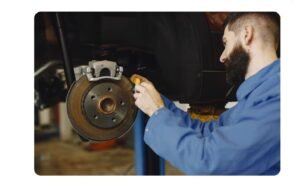
You can often see the pads through the spokes of your wheel (as shown in your uploaded image).11
-
Healthy Pad: Roughly 10–12mm thick.12
-
Worn Pad: If the material looks less than 1/4 inch (6mm), start planning a replacement.
-
Critical: If it’s less than 1/8 inch (3mm), it needs immediate replacement.
4. How to Tell If Rotors Are Bad by Looking at Them
(High-Intent Visual Diagnosis Section)
Before using tools or visiting a mechanic, many brake rotor problems can be identified through a simple visual inspection. By carefully looking at the rotor surface, color, and edges, you can often determine whether the rotors are still safe to use or need replacement.
Deep Grooves or Scoring
Deep circular grooves or heavy scoring on the rotor surface indicate that the brake pads are severely worn. When pads wear down to bare metal, they grind into the rotor, reducing braking efficiency and causing vibration or grinding noise.
Blue or Purple Heat Spots
Blue or purple discoloration on the rotor is a clear sign of overheating. This usually happens due to aggressive braking, towing heavy loads, or a stuck brake caliper. Heat-damaged rotors lose strength and can warp or crack over time.
Cracks or Uneven Wear
Visible cracks, hot spots, or uneven wear patterns mean the rotor has been exposed to extreme heat stress. Uneven wear can also result from improper installation or caliper issues. Cracked rotors are unsafe and should be replaced immediately.
Rust Ridges on Rotor Edges
Rust ridges or raised lips along the outer edge of the rotor form as the braking surface wears down. This indicates rotor thinning and reduced pad contact, which can lead to longer stopping distances and poor braking performance.
5. Worn Rotors vs New Rotors
Understanding the difference between worn and new rotors helps you decide whether resurfacing is possible or full replacement is necessary. A side-by-side comparison clearly shows how wear affects braking performance and safety.
Visual Comparison of Worn vs New Rotors
Worn rotors typically have grooves, discoloration, and rust buildup, while new rotors have a smooth, clean surface with even thickness and sharp edges.
Performance Differences
Worn rotors reduce braking efficiency, cause pedal pulsation, and increase stopping distance. New rotors provide smooth, consistent braking, improved pedal feel, and quieter operation.
Safety Risks of Worn Rotors
Continuing to drive with worn rotors increases the risk of brake failure, damages new brake pads, and compromises vehicle control during emergency stops.
6. Brake Rotor Thickness: When to Replace Rotors
Brake rotor thickness is one of the most important factors in determining rotor safety. Even if a rotor looks fine visually, it may still be unsafe if it has worn below the manufacturer’s minimum thickness.
Minimum Rotor Thickness Explained
Every rotor has a specified minimum thickness designed to handle heat and braking force safely. Once the rotor wears below this limit, it cannot dissipate heat properly and becomes prone to warping or cracking.
Where to Find Rotor Thickness Specs
Minimum rotor thickness specifications can be found stamped on the rotor hat, listed in the vehicle service manual, or provided by the brake manufacturer.
Measuring Rotor Thickness Correctly
To measure rotor thickness accurately, use a micrometer or digital caliper. Take measurements at multiple points around the rotor and avoid the outer rust lip. If any measurement is at or below the minimum specification, the rotor must be replaced.
7. Symptoms of a Bad Brake Rotor
If your rotors are failing, the symptoms are usually physical rather than just auditory. Because the rotor is a heavy, spinning mass, any imperfection creates a noticeable disruption in the vehicle’s “feel.”
-
Steering Wheel Vibration: If the front rotors are warped or have uneven “heat spots,” you will feel the steering wheel shake or shimmy specifically when you apply the brakes at highway speeds.
-
Pulsating Brake Pedal: This is the most common sign of a “bad” rotor. As the brake pads clamp down on a warped disc, they bounce over the high and low spots, sending a rhythmic pulsing sensation back through the hydraulic fluid to your foot.
-
Grinding or Rumbling Noise: While pads squeal, rotors often “rumble.” A deep, low-frequency sound while braking suggests the rotor surface is no longer smooth or has developed a significant “lip” at the edge.
-
Reduced Stopping Power: A compromised rotor surface cannot dissipate heat effectively. This leads to “brake fade,” where the brakes feel less effective the more you use them during a single trip.
8. How Do I Know If I Need New Rotors or Just Pads?
Use this checklist to determine if a “pad-only” service is sufficient or if you need to invest in new rotors.
Replace Pads ONLY if:
-
The rotors are perfectly smooth with no deep grooves (scoring).
-
There is no vibration in the steering wheel or pedal when braking.
-
The rotors still meet the minimum thickness stamped on the part (measured with a micrometer).
-
The rotors have no “blue” tint (indicating extreme overheating).
Replace BOTH Pads and Rotors if:
-
You hear a metallic grinding sound (the pads have already damaged the metal of the rotor).
-
The steering wheel shakes when you slow down from high speeds.
-
The rotors have deep “valleys” or ridges that you can feel with a fingernail.
-
The rotors are rusted or pitted on the friction surface.
Note on Resurfacing: In some cases, a mechanic can “turn” or resurface your rotors on a lathe to make them flat again. However, if the rotor is already near its minimum thickness, replacement is the safer and often more cost-effective choice.
9. What Happens If I Change Brake Pads but Not Rotors?
Many drivers consider a “pad slap” installing new pads on old rotors to save money. While sometimes acceptable, it can lead to several performance issues if the rotors aren’t in peak condition.
1. Noise and Squealing
New brake pads are perfectly flat. If your old rotors have even microscopic ridges, the new pad won’t make full contact. The small gaps allow the pad to vibrate at high frequencies, leading to immediate squealing that is difficult to stop.
2. Uneven and Accelerated Pad Wear
If you put new pads on a “scored” rotor (one with grooves), the pad will eventually wear into the shape of the rotor’s grooves. This “eats” through the new friction material much faster than normal, effectively wasting the money you spent on the new pads.
3. Reduced Brake Performance
Until the new pad “seats” or conforms to the old rotor’s shape, your stopping distance will be increased. You only have a fraction of the intended surface area touching the disc, which can be dangerous in an emergency stop.
4. When it’s safe to reuse rotors
It is generally safe to reuse rotors if they are not warped, have no deep scoring, and have plenty of thickness left. Most experts recommend at least “scuffing” the rotor with sandpaper to break the old glaze before installing new pads to help the bedding-in process.
10. What Is the 30-30-30 Rule for Brakes?
The 30-30-30 rule is the industry-standard “bedding” or “burnishing” procedure used to mate new pads to rotors.
-
The Process: Perform 30 stops from 30 mph with 30 seconds of cooling time between each stop.
-
How it Works: This process uses heat to transfer a uniform layer of friction material from the pad onto the rotor. Without this “transfer layer,” the pads will rub against bare metal, causing noise and uneven wear.
-
Can I Re-bed Brakes? Yes. If you have light vibration or “glazing” (a shiny, mirror-like finish on the rotor), performing the 30-30-30 rule can sometimes “clean” the rotor surface and fix minor brake noise or pedal pulsation.
11. Which Brakes Usually Go Out First?
In most vehicles, the front brakes wear out much faster than the rear brakes.
-
Weight Distribution: When you brake, the car’s weight shifts forward (“nose-dive”). Consequently, the front brakes often handle $60\%-80\%$ of the stopping power.
-
Heat: Because they do more work, front rotors get much hotter, leading to faster pad depletion and a higher risk of warping.
-
Exception: Some modern cars with “Electronic Brake-force Distribution” or advanced cruise control may wear rear pads faster to stabilize the car during light braking.
12. Brake Pads and Rotors Replacement Cost
Understanding the brake rotors and pads replacement cost helps you budget for your repair. Prices vary by vehicle type (e.g., a heavy truck costs more than a sedan).
| Component | Average Part Cost | Average Labor (per axle) |
| Brake Pads Only | $30 – $100 | $80 – $150 |
| Brake Rotors (Pair) | $60 – $200 | $100 – $200 |
| Complete Job | Total: | $300 – $600+ |
13. Should You Buy Brake Parts Online or In-Store?
-
Advance Auto Parts / AutoZone: Great for convenience. You can get parts same-day, and they offer “Limited Lifetime Warranties,” meaning if your pads wear out again, you can often swap them for free.
-
RockAuto: Excellent for price and variety. You can choose between “Economy,” “Daily Driver,” or “Performance” tiers. However, you must wait for shipping, and returns can be cumbersome if you order the wrong size.
14. Advice vs. Mechanic Advice
If you search how to tell if you need new rotors or just brake pads Reddit, you will see a common debate.
-
The Reddit Consensus: “If it doesn’t shake, don’t replace the rotor.” Many DIYers suggest only replacing pads to save money.
-
The Mechanic’s View: Professionals usually recommend replacing both. Why? Because a mechanic’s reputation (and your safety) relies on a silent, smooth stop. Putting new pads on old, “thin” rotors often leads to “comebacks” where the customer returns a week later complaining of a squeak.
15. Final Checklist: Do You Need New Rotors or Just Brake Pads?
To determine how to tell if you need new rotors or just brake pads, run through this final diagnostic checklist:
1. The Visual Test
-
Pads: Is the material thicker than a pencil? If it’s less than $3\text{mm}$, replace them.
-
Rotors: Do you see deep “circular grooves” or a large “lip” at the outer edge? If yes, replace the rotors.
2. The Feel Test
-
Does the steering wheel shake when braking at $60\text{ mph}$? If yes, your rotors are warped and must be replaced or resurfaced.
3. The Measurement (Pro Tip)
-
Check the “Minimum Thickness” stamped on the rotor’s edge. Use a micrometer to measure the current thickness. If it is within $1\text{mm}$ of that limit, buy new rotors.

- Find the Right Engine Oil for Your Car: A Quick Guide - March 1, 2026
- Car Battery Booster Basics: Start Your Vehicle in Minutes - March 1, 2026
- How Long Does It Take To Charge A Motorcycle Battery Charging Time Guide - February 28, 2026